
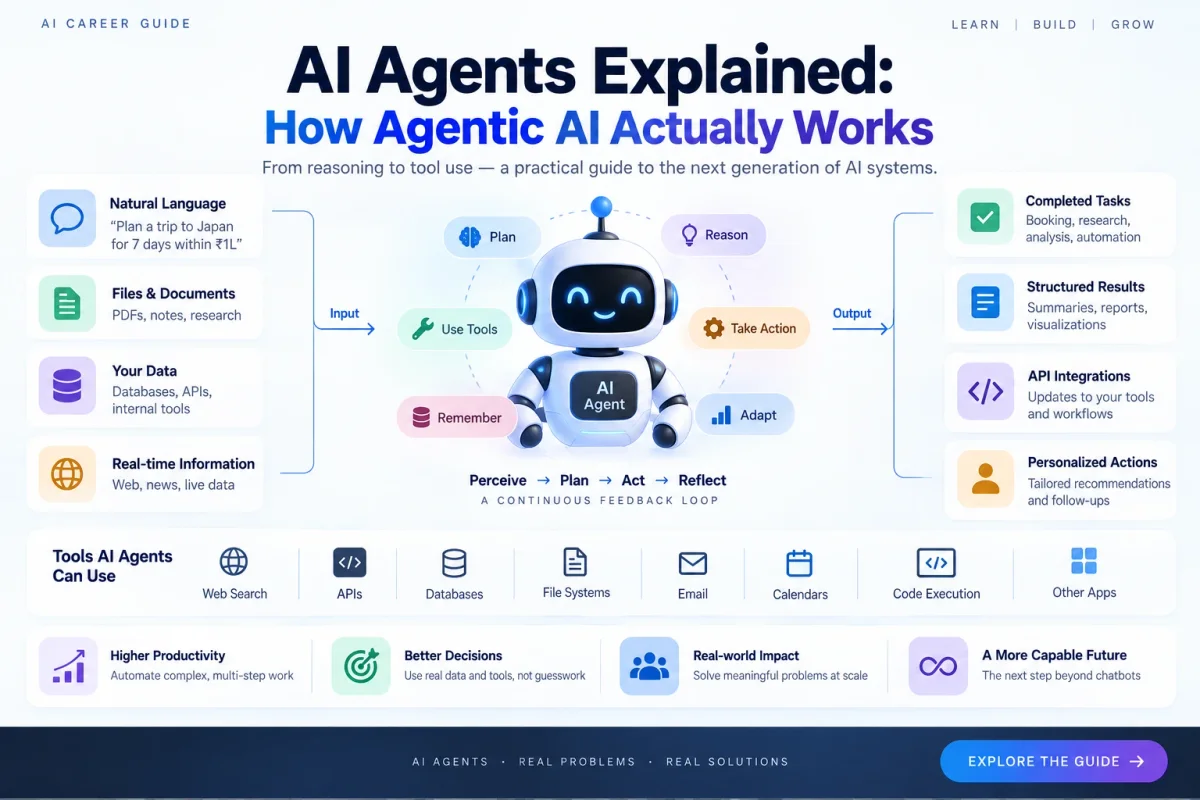
AI agents are becoming one of the most important areas in modern AI engineering. The shift is simple to describe: instead of using an AI model only to generate an answer, we can build systems that use a model to decide what actions should happen next.
That difference changes the architecture of the application. A chatbot often follows input → model → output. An agentic application can follow goal → decide → use a tool → inspect the result → decide again → complete the task. Google has described this broader move from AI that assists people toward agents that can handle complex workflows, while OpenAI has been building computer environments and managed agent capabilities around longer-running tasks.
This guide explains what an AI agent actually is, how the core loop works, why tool use matters, what memory and retrieval really mean, where agents fail, and how you can start building them without adding unnecessary complexity.
What Is an AI Agent?
An AI agent is a software system that uses an AI model to pursue a goal by selecting and executing actions inside a defined environment. It can decide what information it needs, call tools, observe the results, change its next step, and stop when the task is complete or when human input is required.
A useful mental model is:
Perceive → Plan → Act → Observe → Adapt → Repeat
For example, a chatbot might answer, “Here are five good Python courses.” An agent could receive a larger goal: “Find five current Python courses, compare price and syllabus, remove outdated options, rank them for an AI engineering beginner, and prepare a report.” The agent may need to search, retrieve information, compare results, verify details, and generate the final output.
The important point is that an agent is not defined by sounding human or by having consciousness. It is defined by the closed-loop system around the model.
AI Agent vs Chatbot
The terms are often mixed together, but they describe different system behaviors. A chatbot can be highly capable without being an agent.
| System | Typical behavior | Example |
|---|---|---|
| Traditional software | Fixed logic | Calculate tax |
| LLM application | Generate or interpret content | Summarize a PDF |
| Workflow | Predefined steps | Extract → classify → store |
| AI agent | Chooses actions dynamically | Research → verify → compare → report |
| Multi-agent system | Specialized agents coordinate | Researcher + analyst + reviewer |
The key difference is dynamic decision-making inside a workflow. That does not mean an agent must be completely autonomous. In production, deterministic code, validation rules, approval gates, and human oversight are often combined with an LLM.
Anthropic’s guidance makes the same practical point: start with simpler prompts or workflows, and add agentic complexity only when it produces a measurable improvement.
The Core Components of an AI Agent
Most useful agents can be understood through a small set of building blocks.
1. The model
The model interprets the goal, reasons about possible next steps, selects tools, and produces structured actions or final output. But the model is only one component. It cannot automatically access your database, send an email, or modify files unless the surrounding application exposes those capabilities.
Think of the model as the decision engine, not the entire machine.
2. Instructions and goals
An agent needs both a target and constraints. Compare:
Fix the deployment.
with:
Investigate the deployment failure, use read-only diagnostics, reproduce the problem in staging, propose a fix, and request approval before production changes.
The second version defines boundaries. Good agent design makes the task and operating limits explicit.
3. Tools
Tools connect the model to the outside world. They can include web search, databases, REST APIs, code execution, Git repositories, browsers, file systems, email, calendars, monitoring systems, and internal services.
A tool might look conceptually like:
search_web(query)
get_customer(customer_id)
run_sql(query)
run_tests()
create_ticket(title, description)
The model chooses a tool, your application validates the request, executes it, and returns the result. The model then decides what to do next.
This tool boundary is one of the most important design concepts in agent systems.
4. Context and state
Agents need working information about the current task: conversation history, previous tool results, current plan, intermediate files, errors, and other state. Some systems also persist information for later tasks.
Do not treat every form of stored information as “memory.” It is useful to distinguish:
- Working context: information needed now.
- Persistent memory: information stored for future tasks.
- External knowledge: documents, databases, or web content retrieved when needed.
Clear separation makes systems easier to reason about and debug.
5. The execution loop
The execution loop connects everything:
Goal
  ↓
Understand current state
  ↓
Choose next action
  ↓
Call tool or produce action
  ↓
Observe result
  ↓
Task complete? ── No ──→ choose next action
       │
      Yes
       ↓
     Finish
This feedback loop is what makes the system agentic.
Planning: How Agents Break Down Complex Goals
Consider a task such as: “Prepare a market analysis for three AI companies.” A useful agent might identify a sequence like:
- Identify the companies and scope.
- Gather current company information.
- Collect product and business data.
- Compare offerings.
- Check recent announcements.
- Verify important claims.
- Produce a structured report.
There are several ways to implement this. One agent might create an explicit plan first. Another might choose one step at a time. A hybrid workflow may keep known stages deterministic while allowing the model to make decisions inside a stage.
This leads to a critical idea: agentic does not mean fully autonomous.
A strong production architecture is often:
Deterministic workflow + LLM decision points + controlled tools + validation + human approval where needed
That is usually easier to test and safer than giving one model unrestricted control.
Retrieval and RAG in AI Agents
RAG, or Retrieval-Augmented Generation, is often part of an agentic system. A simple RAG application looks like:
Question → Retrieve documents → Generate answer
An agent can make retrieval one step inside a larger loop:
Goal → decide what information is missing → search → inspect results → search again if necessary → answer
For example, a research agent may search for sources, compare claims, identify missing evidence, perform another search, and then produce a cited report. The retrieval strategy becomes adaptive instead of completely fixed.
Why Tool Calling Matters So Much
Tool calling is the bridge between an AI model and a real software system. Suppose an application exposes a weather function. The model can return a structured request such as:
{
  "tool": "get_weather",
  "arguments": {
    "city": "Delhi"
  }
}
The backend executes that function, sends the result back, and the model continues. Conceptually:
User
  ↓
Agent
  ↓
Tool selection
  ↓
Backend executes tool
  ↓
Tool result
  ↓
Agent
  ↓
Final response
The model should not be treated as having unrestricted system access. The application decides which tools exist, what arguments they accept, which permissions they have, and whether approval is required.
MCP and the Growing Tool Ecosystem
As agents use more external capabilities, interoperability becomes important. The Model Context Protocol (MCP) provides a standardized way for AI applications to connect to external data sources and tools. Its architecture defines hosts, clients, servers, and shared protocol behavior.
Conceptually:
AI application
      │
      ├── MCP connection ── Database
      ├── MCP connection ── GitHub
      └── MCP connection ── Files / other tools
MCP does not replace application security, authorization, testing, or business logic. It addresses interoperability. Those are separate engineering concerns.
Why AI Agents Are Harder Than Chatbots
A chatbot may fail by giving a poor answer. An agent can fail at many points:
- Choosing the wrong tool
- Passing incorrect arguments
- Retrieving irrelevant data
- Entering loops
- Repeating expensive operations
- Misinterpreting a tool result
- Acting on stale information
- Losing important state
- Stopping too early
- Continuing when it should stop
The engineering question therefore changes from:
Is the answer good?
into:
Did the whole system achieve the intended outcome safely, efficiently, and reliably?
Evaluating AI Agents
Evaluation is one of the most important differences between an impressive demo and a production system. Agent behavior is multi-step, so you need to measure the trajectory as well as the final response. Anthropic’s work on agent evaluations emphasizes that agents are harder to evaluate precisely because they call tools, modify state, and adapt over multiple turns.
Useful metrics include:
| Metric | What it tells you |
|---|---|
| Task success rate | Did the agent achieve the goal? |
| Tool selection accuracy | Did it choose appropriate tools? |
| Argument correctness | Did it call tools correctly? |
| Step count | Is it doing unnecessary work? |
| Latency | Is it fast enough? |
| Cost | Is the workflow economically viable? |
| Recovery rate | Can it recover from failures? |
| Safety violations | Did it break a policy or permission boundary? |
| Human escalation rate | Does it know when to ask for help? |
An agent that succeeds but uses twelve unnecessary API calls may technically work while still being a poor production system. Good evaluations therefore consider outcome, process, cost, and safety.
Safety: Autonomy Should Match Risk
A dangerous design is:
LLM
 ↓
Full system access
A safer design is:
LLM
 ↓
Allowed tools
 ↓
Permission checks
 ↓
Validation
 ↓
Execution
For example:
| Action | Typical policy |
|---|---|
| Search public information | Automatic |
| Read project files | Automatic or scoped |
| Draft an email | Automatic |
| Send an email | Human approval may be required |
| Delete production data | Highly restricted |
| Deploy to production | Human approval often appropriate |
The principle is simple: autonomy should be proportional to risk.
OpenAI’s recent work on agent environments also highlights practical engineering problems around files, network access, timeouts, retries, and execution isolation as systems move from models toward real-world agents.
Single-Agent vs Multi-Agent Systems
A multi-agent architecture might contain a researcher, coder, tester, and reviewer coordinated by an orchestrator. This can be useful when responsibilities are genuinely distinct.
But more agents do not automatically make a better product. Additional agents can introduce more latency, token cost, coordination complexity, state-management problems, and failure points.
For many systems, a single agent with good tools is enough. Start simple and add specialization only when the complexity solves a real problem.
Real-World AI Agent Examples
Coding agents
A coding agent can inspect a repository, identify relevant files, modify code, run tests, inspect failures, make another change, and prepare a patch. This is more than code generation because the system participates in the software-engineering loop.
Research agents
A research agent can search several sources, extract evidence, compare claims, identify gaps, and generate a structured report.
Customer-support agents
A support agent can identify a problem, retrieve account information, search documentation, check an order, take an approved action, and escalate when policy requires it.
Data-analysis agents
A data agent can inspect a dataset, choose an analysis, execute code, create visualizations, validate results, and explain its findings.
The common pattern is always similar: understand → use tools → observe → adapt → complete.
When Should You Use an AI Agent?
Not every problem needs one. A simple program is usually better when the workflow is completely predictable, a normal API solves the task, or deterministic rules are sufficient.
An agent becomes more attractive when the workflow changes based on what the system discovers, information is incomplete or changing, different tools may be needed, or iterative decisions create meaningful value.
A useful rule is:
If you can describe the entire workflow as a small, stable flowchart, you may not need an agent. If the next step depends heavily on what happens during execution, an agent may be useful.
How to Build Your First AI Agent
Do not start by building a complex multi-agent platform. Build one small agent with a clear task.
A good beginner project is a Research Assistant Agent.
Step 1: Define one task
For example: “Research a technical topic and produce a source-backed report.”
Step 2: Add one model
Use a model that supports structured output and tool calling.
Step 3: Add one or two tools
Start with something like:
search_web()
fetch_page()
Step 4: Build the loop
Goal
 ↓
Model
 ↓
Choose tool
 ↓
Execute
 ↓
Return result
 ↓
Model
 ↓
Finish or continue
Step 5: Add guardrails
Set a maximum number of steps, tool permissions, timeouts, error handling, and human approval for risky actions.
Step 6: Create evaluations
Build a small test set of realistic tasks. Measure whether the agent completes them, uses appropriate tools, avoids unnecessary steps, and handles failure.
Step 7: Improve after measuring
This order matters. Do not add a complicated memory system, multi-agent router, or large framework before you know what the basic agent gets wrong.
What AI Engineers Should Learn for Agentic AI
If you want to work seriously with AI agents, do not start by memorizing an agent framework. Build the underlying engineering stack first.
Foundations
- Python
- Git and Linux
- HTTP and APIs
- JSON
- SQL
- Data structures
- Basic backend development
AI fundamentals
- Machine learning
- Deep learning
- Transformers
- LLMs
- Embeddings
- Tokenization
- Structured outputs
- Prompting
Agent engineering
- Tool calling
- Function schemas
- RAG
- Context management
- State and memory
- Agent loops
- Workflow design
- Evaluation
- Guardrails
- Observability
Production engineering
- Databases
- Authentication and authorization
- Queues and background jobs
- Caching
- Docker
- Cloud deployment
- Monitoring
- Cost optimization
The more capable an AI system becomes, the more important these software-engineering fundamentals become.
The Future of AI Agents
The most important shift is not simply that chatbots become smarter. It is that AI systems are moving from generating information toward participating in workflows.
That means more interaction with software, APIs, databases, browsers, files, development environments, and other services. Google, OpenAI, Anthropic, and the wider developer ecosystem are all investing in the infrastructure needed to make these systems more capable, controllable, and useful.
But the winning agent will not necessarily be the one with the most autonomy. The strongest system will usually be the one that is:
Reliable + Useful + Observable + Secure + Cost-effective
That is the real engineering challenge.
Final Takeaway
AI agents are not magical autonomous beings. They are software systems that combine models, goals, tools, context, state, execution loops, and policies to perform tasks that require multiple decisions.
The core loop is simple:
Perceive → Plan → Act → Observe → Adapt
The hard part is everything around that loop: deciding what the agent can access, validating tool calls, recovering from failure, evaluating behavior, controlling cost, and knowing when a human should take control.
For AI engineers, this makes agentic AI more than another trend or framework. It is a practical systems problem at the intersection of machine learning, software engineering, backend systems, security, and product design.
Start small. Build one agent. Give it a few tools. Measure what it does. Add guardrails. Deploy it. Then improve it.
Learn → Build → Evaluate → Deploy → Improve.
Further Reading
- Google Developers — All the news from the Google I/O 2026 Developer keynote
- OpenAI — From model to agent: Equipping the Responses API with a computer environment
- Anthropic — Building Effective AI Agents
- Anthropic — Demystifying evals for AI agents
- Model Context Protocol — Specification
Explore on AI Career Guide
- AI Engineering
- Generative AI
- LLMs
- AI Engineer Career
- AI Engineering Guide
- AI Engineer Skills
- AI Research Assistant Project
Continue the path
Keep building from here
MCP Explained: The Model Context Protocol for AI Engineers
MCP explained for AI engineers: architecture, clients, servers, tools, resources, prompts, transports, authorization, security, real-world use cases, and how to build your first MCP integration.
AI Engineer Skills: What You Actually Need to Learn
A practical AI engineer skills guide covering software engineering, ML, LLMs, RAG, evaluation, deployment, systems, and problem solving.
AI Engineer Roadmap
A practical AI engineer roadmap covering software engineering, math, ML, deep learning, LLMs, deployment, evaluation, and career preparation.
AI Research Assistant
Build an LLM research assistant with document search, evidence retrieval, grounded summaries, source comparison, and citations.
Hugging Face Hub
A platform for models, datasets, demos, and APIs for modern machine learning and LLM development.
AI Engineer Roadmap
A practical AI engineering learning path connecting programming, ML, LLMs, deployment, projects, and career preparation.