
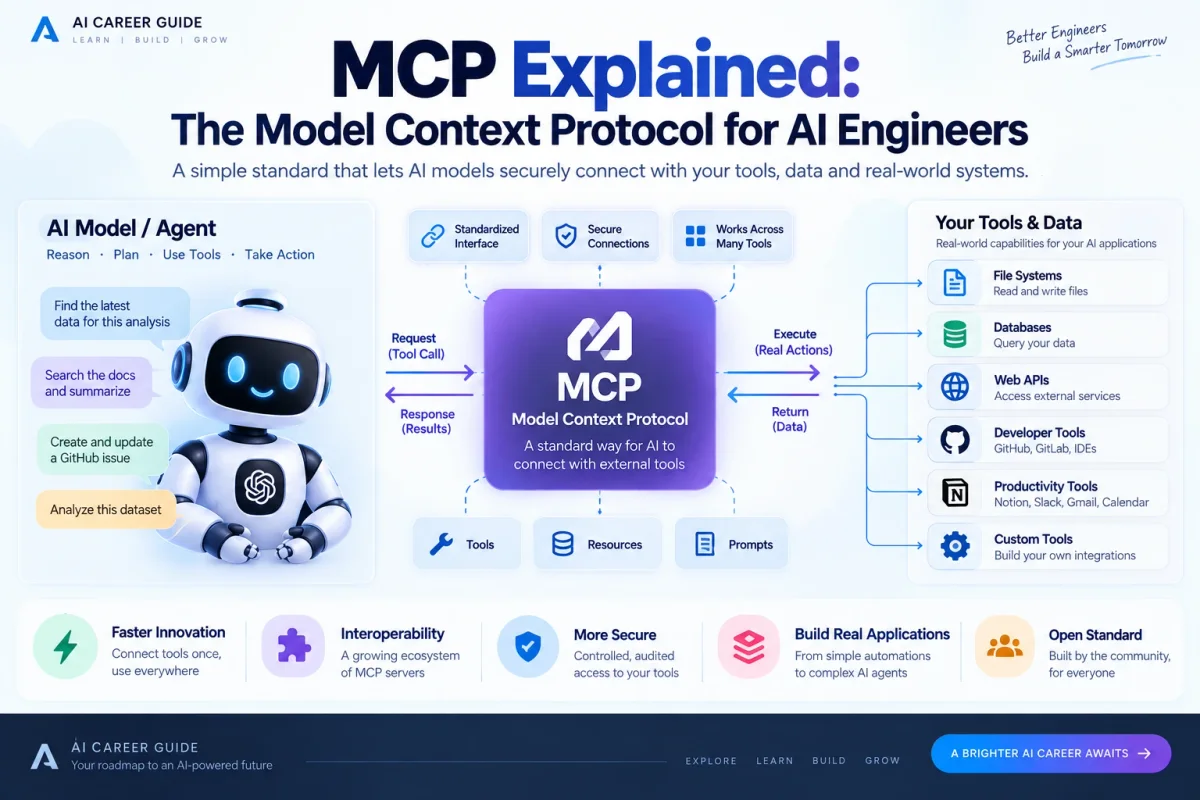
Modern AI applications are moving beyond simple prompt-and-response interfaces.
An AI assistant may need to read a repository, query a database, search internal documentation, inspect a ticket, create a GitHub issue, call an API, or update a business system.
Without a common protocol, every AI application has to build its own integrations.
That is the problem Model Context Protocol (MCP) is designed to address.
MCP is an open standard for connecting AI applications to external data sources and tools. Anthropic introduced it publicly in November 2024, describing it as a common way for AI systems to connect to content repositories, business tools, and development environments. citeturn846607view1
The idea is simple:
Instead of building a custom connector for every AI application and every tool, use a common protocol for discovering and using capabilities.
For AI engineers, that distinction matters. MCP is not a new model, a new database, or an agent framework. It is an integration protocol that sits between AI applications and the systems they need to work with.
This guide explains MCP from an engineering perspective: what it is, how its architecture works, what tools/resources/prompts mean, how requests move through the system, where security matters, and when MCP is actually useful.
What Is MCP?
MCP stands for Model Context Protocol.
At its core, MCP defines a standardized way for an AI application to connect with external capabilities.
A simplified picture is:
AI Application
      |
      | MCP
      v
MCP Server
      |
      +---- Files
      +---- Database
      +---- API
      +---- GitHub
      +---- Search
      +---- Internal Systems
The AI application is the consumer of the protocol. The MCP server exposes capabilities in a predictable way.
The important part is the interface between them.
Without MCP, you might have:
App A -> custom GitHub integration
App A -> custom PostgreSQL integration
App A -> custom Slack integration

App B -> another GitHub integration
App B -> another PostgreSQL integration
App B -> another Slack integration
With MCP, the applications can use a common protocol:
                 MCP
                  |
        +---------+---------+
        |         |         |
      GitHub     DB       Slack
      Server    Server    Server
This does not magically eliminate all integration work. Someone still has to build and operate the MCP server, define permissions, validate inputs, and maintain the underlying integration.
What MCP provides is standardization at the connection layer.
Anthropic’s original announcement explicitly described this goal as replacing fragmented, per-data-source implementations with a universal open standard. citeturn846607view1
Why Does MCP Matter?
LLMs are good at reasoning over information, but the model usually does not directly own the systems where useful information lives.
Your model does not automatically have access to:
- Your private repository
- Your company’s database
- Your CRM
- Your calendar
- Your file system
- Your internal documentation
- Your deployment system
- Your project management tool
The application has to provide those capabilities.
Historically, developers solved this with custom function definitions and custom connectors.
That works, but integration complexity grows quickly.
Imagine an organization with:
20 AI applications × 30 tools
A completely custom approach can become difficult to maintain because every application may need its own connector logic.
A standardized protocol can reduce the amount of bespoke integration code at the application layer.
That is the larger idea behind MCP.
MCP vs an API
This is one of the first distinctions an AI engineer should understand.
An API exposes functionality.
MCP provides a standardized protocol for AI applications to discover and interact with capabilities exposed by an MCP server.
For example, a normal API might provide:
GET /customers/123An MCP server might expose a tool conceptually like:
get_customer(customer_id)The MCP layer provides standardized discovery, schemas, invocation, and protocol behavior around that capability.
So MCP is not replacing HTTP APIs, databases, or business systems.
Instead:
AI Application
      |
     MCP
      |
MCP Server
      |
      +---- REST API
      +---- SQL database
      +---- filesystem
      +---- SDK
The MCP server is often the adapter between the protocol and the underlying system.
MCP Architecture
The core architecture can be simplified into three concepts:
              MCP Host
        (AI application)
                |
        +-------+-------+
        |               |
      Client          Client
        |               |
        v               v
   MCP Server       MCP Server
        |               |
      GitHub          Database
1. Host
The host is the AI application that wants to use MCP.
Examples could include an AI coding environment, an assistant, an agent platform, or another application embedding a model.
The host is responsible for coordinating the overall interaction and typically contains one or more MCP clients.
2. Client
An MCP client maintains the protocol connection to an MCP server on behalf of the host.
The client handles protocol communication and capability discovery.
A host may connect to several MCP servers through separate clients.
3. Server
The MCP server exposes capabilities to clients.
Those capabilities can include tools, resources, and prompts.
The server is the component that normally has access to the underlying external system.
For example:
AI Host
  |
  +-- MCP Client -> GitHub MCP Server -> GitHub API
  |
  +-- MCP Client -> Postgres MCP Server -> PostgreSQL
  |
  +-- MCP Client -> Files MCP Server -> File system
That separation is useful because it keeps the AI application from needing to understand every underlying system directly.
The Three Core MCP Primitives
One of the most important parts of MCP is understanding the difference between tools, resources, and prompts.
They solve different problems.
Tools
Tools are executable capabilities.
Examples:
search_documents()
create_issue()
run_query()
send_email()
run_tests()
A model or agent can decide to invoke a tool as part of a task.
Conceptually:
Goal
 ↓
Model decides
 ↓
Call MCP tool
 ↓
Tool executes
 ↓
Result returned
 ↓
Model continues
Tools are therefore the part of MCP most directly associated with taking actions.
Resources
Resources represent data or context that an MCP server can expose.
Think of them as information an AI application can retrieve from a server.
Examples might include:
file:///docs/architecture.md
postgres://database/schema
repo://project/readme
The exact URI design depends on the server.
Resources are useful when the application needs access to information rather than an executable action.
A simple distinction is:
Tool = do something
Resource = provide information
Prompts
Prompts are reusable prompt templates exposed through the protocol.
For example, a server could expose a template such as:
review_pull_requestwith parameters such as:
repository
pull_request
review_focus
The host can then use a standardized prompt definition rather than hard-coding the same template separately.
This can be useful when domain-specific instructions belong close to the system exposing the data or capability.
A simplified mental model is:
| Primitive | Main purpose |
|---|---|
| Tools | Perform actions |
| Resources | Provide data/context |
| Prompts | Provide reusable interaction templates |
Do not collapse all three into “functions.” They have different semantics.
How an MCP Request Works
At a high level, a tool call can look like this:
User asks for a task
        ↓
AI model decides a tool is needed
        ↓
MCP client sends request
        ↓
MCP server validates request
        ↓
Underlying system executes action
        ↓
Result returns through MCP
        ↓
AI application gives result to model
        ↓
Model continues or responds
For example:
“Check the latest production error logs and tell me what failed.”
The model might decide it needs a log-search tool.
search_logs(query="production error")The MCP server handles that request, talks to the logging system, and returns the result.
The model then interprets the returned information.
This is where MCP becomes useful for agentic systems: the model can operate over standardized external capabilities instead of having every application invent its own integration pattern.
MCP Uses JSON-RPC
MCP communication is based on JSON-RPC messages.
That gives the protocol a structured request/response model.
A conceptual request looks like:
{
  "jsonrpc": "2.0",
  "id": 1,
  "method": "tools/call",
  "params": {
    "name": "search",
    "arguments": {
      "query": "MCP"
    }
  }
}
The exact protocol requirements depend on the MCP specification version and transport.
The important engineering idea is that MCP standardizes what is being requested and how the request is represented, rather than forcing every AI application to invent its own tool protocol.
MCP Transport: How Messages Move
MCP needs a way to carry protocol messages between a client and server.
The ecosystem has supported local and remote communication patterns, including standard input/output for local integrations and HTTP-based transports for remote servers.
The current MCP direction is especially important here.
The 2026-07-28 specification moved the protocol core toward a stateless request/response architecture. It also introduced header-based routing, cache hints for list responses, and updated authorization behavior. citeturn846607view0
The change matters because stateless services are much easier to scale horizontally.
Instead of requiring a specific server instance to remember transport-level session state, requests can be routed through ordinary infrastructure such as load balancers and gateways.
The July 2026 specification explicitly describes requests being able to land on any server instance behind a normal round-robin load balancer. citeturn846607view0
For AI engineers, this is an important lesson:
Protocol design directly affects production architecture.
A protocol that works nicely on a laptop is not automatically a protocol that works well at enterprise scale.
What Changed in the 2026 MCP Specification?
MCP is a living standard, so version awareness matters.
The July 28, 2026 release introduced several significant changes, including:
- A stateless protocol core
- Multi Round-Trip Requests
- Header-based routing
- Cacheable list results
- Authorization hardening
- A formal extensions framework
- Tasks as an extension
- Updated SDK support
The release also deprecated several older mechanisms, including the legacy HTTP+SSE transport and some older protocol features, with transition periods. citeturn846607view0
This is important when reading tutorials online.
A blog post from 2024 or 2025 may show a configuration that is no longer the recommended approach for a new implementation.
Before copying MCP code from a tutorial, check the version of the specification it targets.
MCP and AI Agents
MCP becomes particularly interesting when combined with agents.
Consider an AI research agent.
Without external tools:
User
 ↓
LLM
 ↓
Answer
With MCP:
                    ┌── Web Search
                    │
Agent → MCP Client ──┼── Documentation
                    │
                    ├── Database
                    │
                    └── Internal API
The agent can now access a standardized collection of capabilities.
For example:
User:
"Investigate why our API latency increased this week."

Agent:
  1. Query monitoring data
  2. Read recent deployment information
  3. Inspect relevant logs
  4. Compare metrics
  5. Identify likely cause
  6. Prepare report
Each capability could be exposed by an MCP server.
MCP therefore acts as an important connective layer for agentic systems.
That does not mean every agent must use MCP. A simple application with three tightly controlled tools may not need it.
The value increases when an AI application needs to interact with a growing ecosystem of external capabilities.
MCP vs Function Calling
This is another common source of confusion.
Function calling usually means a model is given a set of functions or tools that the application itself knows how to execute.
For example:
LLM
 |
 +-- get_weather()
 +-- search_products()
 +-- create_ticket()
The application defines those functions directly.
MCP provides a standardized protocol through which an application can discover and interact with capabilities exposed by MCP servers.
So these concepts are not direct competitors.
A useful way to think about it is:
Function calling = model-to-application tool interaction
MCP = standardized client/server protocol for exposing and consuming AI capabilities
An MCP server can expose tools that ultimately participate in a model’s tool-calling workflow.
MCP gives the integration a common protocol boundary.
MCP Does Not Make an AI Model Smarter
This is worth emphasizing.
MCP does not improve the model’s raw intelligence.
It improves the model’s access to capabilities and context.
Suppose you have a highly capable model with no access to your internal systems.
It may still be unable to answer:
“Which customer accounts failed their payment retries today?”
Connect it to an authorized database through an appropriate integration, and now the application can retrieve the required data.
MCP is part of the plumbing that makes this kind of connection standardized.
So:
Better model
   ≠
Better connected system
A production AI system often needs both.
Security Is a Core MCP Engineering Problem
Giving an AI model access to tools is powerful.
It is also risky.
An MCP server might expose capabilities that can:
- Read private documents
- Query sensitive data
- Modify records
- Send messages
- Create tickets
- Execute code
- Trigger deployments
You therefore should never treat an MCP server as “just another plugin.”
It is an access boundary.
Least privilege
Give each server only the permissions it actually needs.
A documentation server may need read access to a documentation directory.
It should not automatically receive permission to delete arbitrary files.
Input validation
Never assume that model-generated arguments are safe.
Validate:
- Types
- Ranges
- Allowed identifiers
- Paths
- Query structure
- Permissions
Authorization
Remote MCP servers need a proper authentication and authorization strategy.
The 2026 specification includes additional authorization hardening, including issuer validation and changes around client registration behavior. citeturn846607view0
Auditability
Record enough information to answer:
Who called the tool?
Which tool was called?
What arguments were supplied?
What resource was accessed?
What happened?
Was approval required?
This matters for debugging, security reviews, and compliance.
Human Approval and MCP
Some operations should not happen automatically.
For example:
Read repository       -> automatic
Search documentation  -> automatic
Create draft          -> automatic
Send production email -> approval
Delete records        -> approval or blocked
Deploy production     -> approval
The MCP ecosystem is also evolving toward interaction patterns where a server can require additional user input or confirmation during a workflow. The 2026-07-28 specification introduced Multi Round-Trip Requests for cases such as missing input or user confirmation. citeturn846607view0
This reinforces a broader principle for agent engineering:
Autonomy should be limited by the risk of the action.
What Can You Build with MCP?
MCP can be useful anywhere an AI application needs standardized access to external systems.
AI Coding Assistant
Connect the assistant to:
- GitHub
- Local repositories
- Issue trackers
- CI systems
- Documentation
- Databases
Then the assistant can gather context before proposing or making changes.
Research Assistant
Connect to:
- Search
- Academic databases
- Internal documents
- Citation stores
The agent can retrieve evidence as part of the research workflow.
Data Analyst Agent
Connect to:
- SQL databases
- Data dictionaries
- Analytics systems
- Visualization tools
The agent can inspect data, run analysis, and return structured findings.
Enterprise Assistant
Connect to:
- CRM
- Internal documents
- Calendar
- Support tickets
- Slack
- Business APIs
This can turn a general-purpose model into a more useful company assistant while keeping integration concerns behind defined server boundaries.
Why MCP Can Be Better Than Building Everything Yourself
Imagine your company has five AI applications and fifty internal systems.
Without a shared protocol, every application team may build its own integrations.
That can produce:
Many apps
×
Many custom connectors
×
Different auth patterns
×
Different schemas
×
Different logging
MCP does not automatically solve governance, but it gives an organization a common interface for exposing capabilities.
That makes several things easier to standardize:
- Tool descriptions
- Input schemas
- Resource access
- Protocol behavior
- Client/server boundaries
- Authentication patterns
- Operational infrastructure
The protocol therefore becomes an architectural boundary rather than merely a convenience library.
MCP Is an Ecosystem, Not a Single Product
MCP is often described as though it were one application.
It is not.
It includes:
- A specification
- SDKs
- Client implementations
- Server implementations
- Ecosystem integrations
- Community projects
- Registries and tooling
- Extensions
Anthropic donated MCP to the Linux Foundation’s Agentic AI Foundation (AAIF) in December 2025, with Anthropic, Block, and OpenAI among the co-founders and support from organizations including Google, Microsoft, AWS, Cloudflare, and Bloomberg. Anthropic said at the time that MCP had already been adopted across several major AI products and had more than 10,000 active public servers. citeturn737790search1
That governance direction matters because open standards tend to become more valuable when multiple vendors and developer communities can participate.
How to Build Your First MCP Server
You do not need to start with a huge enterprise integration.
Build something small.
A good first project is a local documentation MCP server.
For example:
User asks:
"Find the authentication rules in our docs."

AI application
      ↓
MCP client
      ↓
Documentation MCP server
      ↓
Search/read tools and resources
      ↓
Relevant document
      ↓
AI response
Step 1: Pick one system
Start with one data source.
Examples:
- A folder of Markdown files
- A small SQLite database
- A public API
- A Git repository
Step 2: Define one capability
For example:
search_docs(query)Do not expose twenty tools just because you can.
Step 3: Define the input schema
Be explicit.
{
  "type": "object",
  "properties": {
    "query": {
      "type": "string"
    }
  },
  "required": ["query"]
}
Step 4: Implement the backend operation
The server takes the validated input and calls your actual code.
MCP tool
   ↓
validation
   ↓
application function
   ↓
filesystem / DB / API
Step 5: Connect an MCP client
Use an MCP-capable AI application or build a client with an official SDK.
The current MCP ecosystem has first-class SDK support across TypeScript, Python, Go, and C#, with Rust support also available. citeturn846607view0
Step 6: Test failure cases
Do not only test the happy path.
Test:
- Missing arguments
- Invalid arguments
- Unauthorized access
- Empty results
- Network failures
- Slow requests
- Tool errors
- Unexpected external data
That is where the real engineering begins.
Example: MCP Tool Design
Suppose you want to expose GitHub issue creation.
A weak tool might be:
create_issue(anything)A better interface would define explicit fields:
create_issue(
    repository,
    title,
    body,
    labels
)
Then enforce rules such as:
repository -> allow-listed repository
labels     -> known labels only
title      -> length limit
body       -> size limit
Good MCP engineering is therefore partly about good API design.
The model should have enough information to use the tool correctly, while the server should never rely on the model to enforce security.
Common MCP Mistakes
Mistake 1: Thinking MCP is an agent framework
It is not.
MCP provides a protocol for interoperability between AI applications and external capabilities.
You still need an agent loop, model, orchestration logic, evaluation, and application architecture when your use case requires them.
Mistake 2: Exposing too many tools
More tools can increase complexity and make tool selection harder.
Expose focused capabilities with clear names and descriptions.
Mistake 3: Trusting model-generated arguments
The model can make mistakes.
Validate everything on the server side.
Mistake 4: Ignoring permissions
An MCP server is an access boundary.
Treat it like production infrastructure.
Mistake 5: Following outdated tutorials blindly
MCP is evolving quickly.
For example, the July 2026 specification changed the protocol core, updated authorization behavior, introduced extensions, and deprecated several older mechanisms. citeturn846607view0
Always check the specification version before implementing from an older article.
MCP vs RAG vs Function Calling vs AI Agents
These technologies often appear together, but they solve different problems.
| Technology | Main problem it solves |
|---|---|
| RAG | Retrieve relevant knowledge |
| Function calling | Let a model request application actions |
| MCP | Standardize AI client/server access to capabilities |
| AI agent | Perform multi-step work using models, tools, and state |
They can be combined.
For example:
AI Agent
   |
   +-- MCP client
          |
          +-- Search server
          +-- Database server
          +-- GitHub server
A search server may internally use vector search or RAG.
A GitHub server may expose tools that the model invokes through tool calling.
MCP is the common protocol boundary between the application and those servers.
Should Every AI Engineer Learn MCP?
You do not need to become an MCP specialist to be a good AI engineer.
But learning MCP is increasingly useful because it teaches an important engineering concept:
AI applications need standardized interfaces to interact with real systems.
The skills you gain from learning MCP transfer directly to other areas:
- API design
- Distributed systems
- Authentication
- Tool calling
- Schema design
- Agent architecture
- Observability
- Security
- Protocol design
So even if you later work with another agent framework, the underlying ideas remain useful.
A Practical Learning Roadmap for MCP
If you are a beginner, follow this order.
Stage 1: Software fundamentals
Learn:
- Python or TypeScript
- HTTP
- JSON
- REST APIs
- JSON Schema
- Git
- Basic authentication
Stage 2: LLM fundamentals
Understand:
- Prompting
- Tool calling
- Structured outputs
- Context windows
- Embeddings
- RAG
Stage 3: MCP fundamentals
Learn:
- Host
- Client
- Server
- Tools
- Resources
- Prompts
- Transport
- Capability discovery
Stage 4: Build one server
Create a simple server around:
Local files
      or
SQLite
      or
Public API
Stage 5: Connect it to an AI application
Let a model use your capability through MCP.
Stage 6: Add production concerns
Study:
- Authentication
- Authorization
- Least privilege
- Input validation
- Logging
- Rate limiting
- Error handling
- Monitoring
- Testing
At that point you are no longer just learning MCP.
You are learning AI systems engineering.
The Future of MCP
MCP is evolving alongside agentic AI.
The July 2026 specification shows the direction clearly: the protocol is becoming more focused on scalability, stateless infrastructure, authorization, extensions, long-running work, and production deployments. citeturn846607view0
The ecosystem roadmap is also explicitly focused on areas such as transport evolution, agent communication, governance, and enterprise readiness. citeturn737790search4
That suggests a broader shift.
The important future question is no longer only:
“Which model should I use?”
It is increasingly:
“How should my AI system safely interact with the software and data around it?”
Protocols like MCP are part of that answer.
Final Takeaway
MCP is best understood as a common integration language between AI applications and external capabilities.
It does not replace LLMs.
It does not replace APIs.
It does not replace databases.
It does not replace agent frameworks.
Instead, it provides a standardized protocol boundary through which AI applications can discover and interact with tools, resources, and prompts exposed by MCP servers.
The mental model to remember is:
                AI Application
                      |
                  MCP Client
                      |
                MCP Protocol
                      |
                  MCP Server
                      |
        +------+------+------+------+------+
        |      |      |      |      |      |
      Files   DB     APIs   GitHub  Search  Apps
And the engineering rule to remember is even more important:
Standardized connectivity is useful only when the capabilities behind it are well-designed, authorized, validated, observable, and safe.
Learn MCP because it helps you understand how modern AI systems connect reasoning models to real software.
Build a small MCP server.
Connect it to an AI application.
Then add authentication, validation, testing, and observability.
That is a much more valuable skill than simply knowing what the acronym stands for.
What to Learn Next
Continue with these AI Career Guide topics:
- AI Agents Explained: How Agentic AI Actually Works
- AI Engineer Skills: What You Actually Need to Learn
- AI Engineering Guide
- LLMs Guide
- Deep Learning Guide
- AI Engineer Roadmap
- AI Research Assistant Project
Learn → Build → Evaluate → Deploy → Improve.
Continue the path
Keep building from here
AI Agents Explained: How Agentic AI Actually Works
AI agents explained from the ground up: how agents plan, use tools, manage context, take actions, handle failures, and how developers can build reliable agentic AI systems.
AI Engineer Skills: What You Actually Need to Learn
A practical AI engineer skills guide covering software engineering, ML, LLMs, RAG, evaluation, deployment, systems, and problem solving.
AI Engineer Roadmap
A practical AI engineer roadmap covering software engineering, math, ML, deep learning, LLMs, deployment, evaluation, and career preparation.
AI Research Assistant
Build an LLM research assistant with document search, evidence retrieval, grounded summaries, source comparison, and citations.
Hugging Face Hub
A platform for models, datasets, demos, and APIs for modern machine learning and LLM development.
AI Engineer Roadmap
A practical AI engineering learning path connecting programming, ML, LLMs, deployment, projects, and career preparation.